
One
tap and it jumps.
No subscription, no app, no account – just a file. The weekview Digital Planner is an interactive PDF with clickable tabs: a tap on Mar takes you to March, one on Wk 14 to that calendar week. You write on it with an Apple Pencil, stylus, keyboard or mouse.
The feel of paper, plus a search function.
Digital planning means keeping your calendar on a tablet, notebook or PC – with the calm of a paper planner and the advantages of the digital world. You write as you would on paper, but you can search, move, copy and sync through the cloud.
Instead of a rigid calendar app you get an interactive, writable PDF. It opens in the software you already use – and it belongs to you. No subscription that expires, no provider that discontinues the app.
What sets it apart from an ordinary PDF are the colourful tabs along the edge: the quarters along the top, together with Goals and Projects, the months down the right and below them Lists, Notes, Contacts and Navi. You do not turn pages, you jump.
Tested with
- GoodNotes on iOS, iPadOS, Android and Windows – with tabs, pen and keyboard input
- Xodo – the recommendation for Android and for working on a PC
- PDF-XChange Editor and Adobe Acrobat Pro on the desktop
- In principle any software that supports PDF annotations
What is inside
- A A week across one double page with appointments, weekly goals and notes
- Monthly overviews, quarterly planning and annual goals
- 42 note pages and 20 freely nameable lists (Business 2026)
- Public holidays, year overviews and a time-zone map
Seven spots. One tap.
This is what a weekly double page looks like in the Digital Planner. Tap a spot, or pick one from the list.
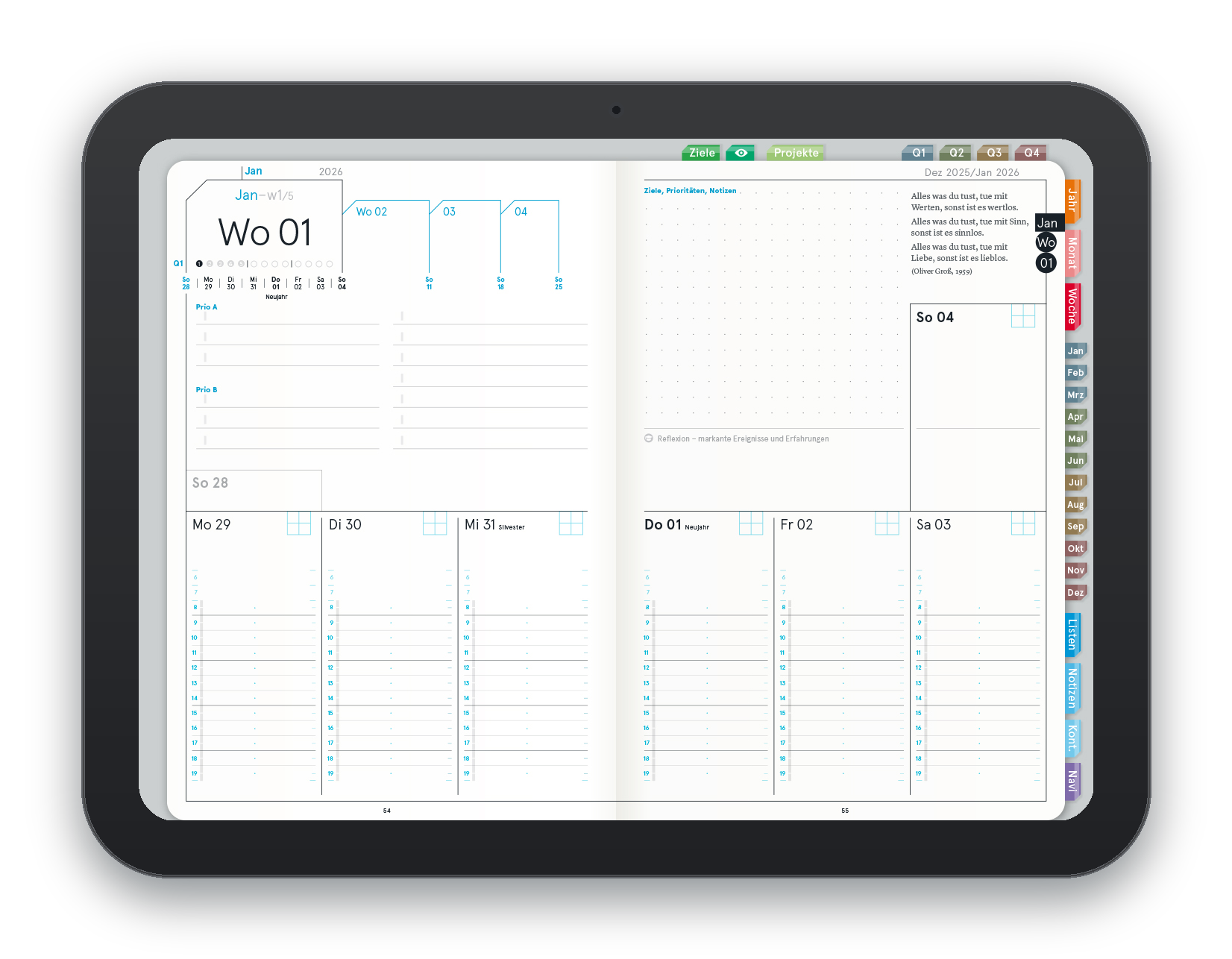
Goals, projects and the quarters
The bar along the top edge is linked: Goals takes you to the goal system, Projects to the project pages, Q1 to Q4 to the quarter in question. One tap is all it takes – no scrolling through three hundred pages.
Wk 01 – the week as an address
Top left sits the calendar week to ISO 8601, and below it the seven days with their dates. At weekview the week is the basic unit of planning, not the day – which is why it is set so large.
The next three weeks
Right beside it sit Wk 02, 03 and 04 with their appointments. Anything already fixed but not yet due goes there – and is in plain sight when you plan the new week.
The essentials first
The large field on the left is the heart of the weekview principle: Prio A is what is essential this week, Prio B what is important. Start the week this way and you sort once instead of re-sorting every day.
Goals, priorities, notes
The right-hand page carries the open part: goals and priorities, a dotted field for notes and, below it, the line Reflection – notable events and experiences. The quote of the week sits at the top.
Sunday to Sunday
The week begins on Sunday – the weekview week starts on Sunday morning at 6:00 . Every column has an hour bar for appointments and room for daily tasks below.
Jan to Dec, lists, notes, Navi
The months run down the right-hand edge as colourful tabs, and below them Lists, Notes, Contacts and Navi. That takes the place of the index tabs of a paper planner – except it never frays.
Why a PDF and not an app? Because a file belongs to nobody but you. It does not expire, needs no login and sits in your cloud – not in that of a provider who might be gone in five years.
Fifteen products. One file format.
From the year planner at 1.95 € to the full annual planner – all as PDF, all available instantly.
 A4 · with navigation
Digital Planner Pro 2027
The full annual planner: weekly planning across double pages, goal system, quarterly planning, project and business tools, notes management – all linked by tabs.
39.95 € Business · 2027
Business 2027 – double page
One week as a landscape double page: appointments, priorities and notes at a glance. Clickable tabs for year, quarter, month and week.
29.95 € Business · 2027
Business 2027 – single page
The same weekly layout on single portrait pages – for tablets held upright and for smaller screens.
29.95 € 31 pages · linked
notes squared and dotted
Digital notebooks with a navigation button: the list numbers are linked, so you jump straight from the overview to the note.
9.95 € each Quarter · 13 weeks
3-Month Pad
Three months down, four to five weeks across – the timeline view for mid-term planning, with fields for month, year and topic.
14.95 € Day · A5
DayPad 4.0
The three most important tasks of the day, a timeline from 8 to 21 , highlights, lowlights and lessons learned – plus an outlook on tomorrow.
14.95 € Goes with it
Sticker & Header
Colourful PNG icons and headers to drag straight in – they live one world along in Sticker & Header.
19.90 € eachJump, search, back up, save
A Digital Planner is not better paper. It does four things a sheet of paper cannot – and leaves other things out in return.
Tabs instead of page-turning
Quarter, month, calendar week, lists, notes – everything is linked. One tap is all it takes, even in a three-hundred-page document.
ISO 8601Find your handwriting again
Anything you type, search finds instantly. And anything you write by hand, GoodNotes finds too – its handwriting recognition searches your notes as well.
View ProNothing gets lost
A paper planner exists once. A file sits in your cloud and on every device you connect to it – even when your bag stays behind on the train.
Cloud-readyNo shipping, no waiting
No parcel, no delivery time, no shipping costs. Bought at ten in the evening, in use by five past ten.
Instant downloadA year that never runs out.
The Digital Planner Pro is the full business planner – only without the paper, without the weight and without the question of where to put it.
Digital Planner Pro | A4 Business 2027
Weekly planning across double pages, goals and reflection, quarterly planning, project and business tools, notes management and lists – all connected by interactive tabs. Works with Apple Pencil, stylus, keyboard or mouse.
- Interactive, writable PDF
- A week across one double page
- Goals, priorities, reflection
- Quarterly planning and goal system
- Project and business tools
- Cloud-ready and platform-independent
All prices incl. VAT. Instant download, so no shipping costs. The file is intended for your own personal use.
Download. Then write.
Four steps from checkout to your first written week.
“A quarter of an hour of planning saves days of work.”
Three desks, three reasons
Not because it is more modern – but because the device is already lying there anyway.
“I do not lug a folder around any more.”
One tablet, every year, every note searchable. On the train, in the hotel, at a client's – and on the plane it weighs nothing.
“I need it on two devices.”
The big screen at your desk, the tablet on the move. Through the cloud both hold the same version – no syncing by hand, no second copy.
“I do not want to retype anything.”
Notebooks squared and dotted, linked to the overview. Whatever is written once gets found again instead of written again.
What the descriptions say
There are no customer reviews for the digital products yet. So here are two lines taken straight from the product texts themselves – unchanged.
Digital planning means keeping your calendar on a tablet, laptop or PC – with the steadiness of a paper planner and the advantages of the digital world.
Instead of a rigid app you get an interactive, writable PDF that you can use with a pen or a keyboard in your favourite PDF software.
Not a customer quote but weekview's own product description – marked as such because these items have no reviews yet. Reviews of the printed planners can be found on their individual product pages.
Frequently asked questions about the Digital Planner
Which app do I need?
Is this a subscription?
What does “with navigation” mean?
Does it work on Android or Windows too?
Can I print the Digital Planner as well?
May I pass the file on?
What is best to write with?
And what if I would rather have paper?
No parcel. No waiting.
Prices start at 1.95 €, the full annual planner at 39.95 € – both available the moment you buy.
These worlds might be for you

Digital A4 weekly planner 2027 with hyperlink navigation for GoodNotes, Notability & co. Download instantly as a PDF and write by hand with Apple Pencil.

weekview Digital Planner Business 2027, single-page: linked PDF for iPad & GoodNotes, portrait. Quarterly planning, 42 notes pages, 20 lists. Instant download.
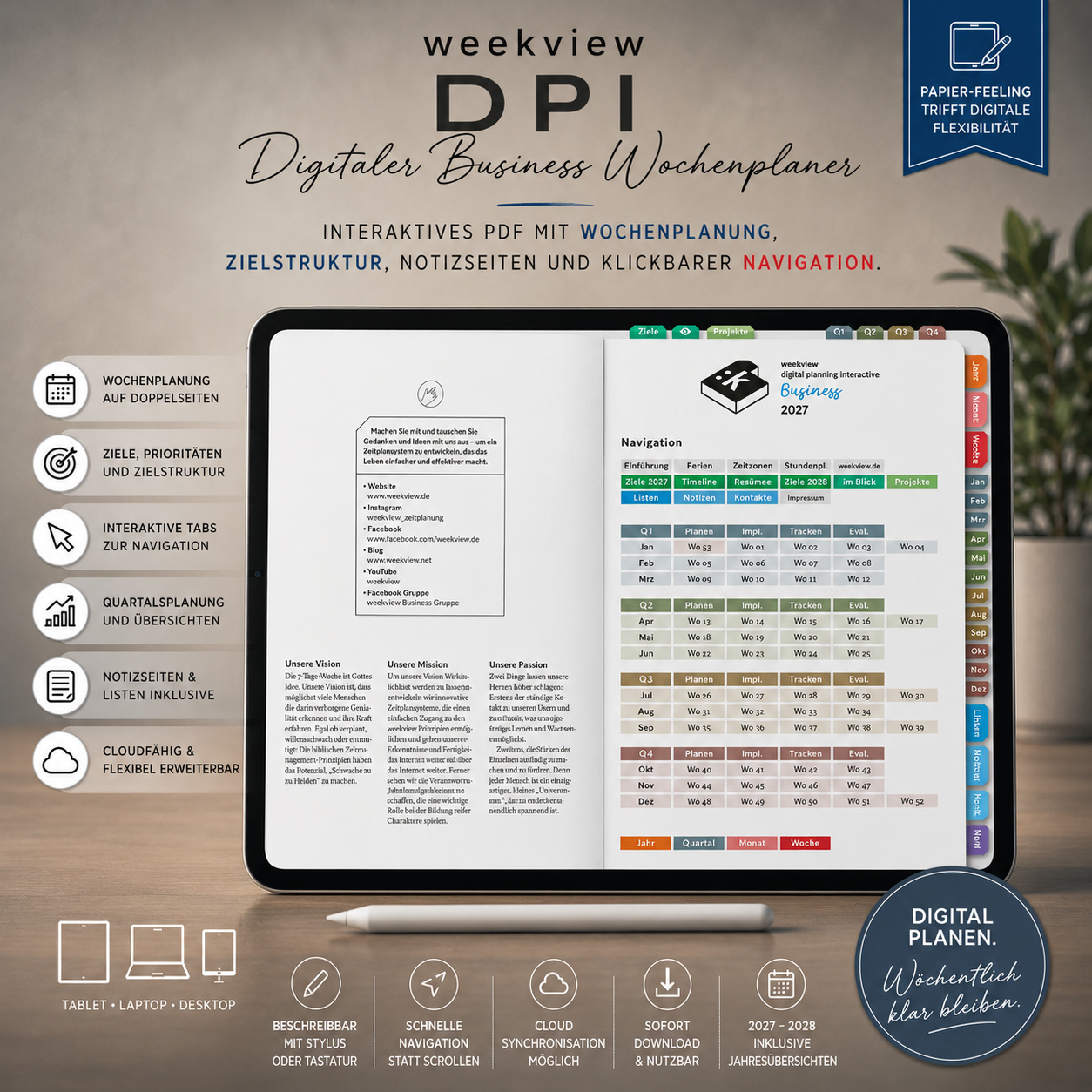
weekview Digital Planner Business 2027: linked PDF for iPad & GoodNotes – the week as a landscape double page. Quarterly planning, 42 notes pages, 20 lists.

weekview Digital Planner: interactive PDF for GoodNotes, Xodo & Adobe. Weekly planning, quarterly goals – instant download.

weekview Digital Planner: interactive PDF for GoodNotes, Xodo & Adobe. Weekly planning, quarterly goals – instant download.

weekview Digital Planner Business 2026: a weekly planner as a PDF for iPad and GoodNotes. ABC system, quarterly rally, fully linked. Instant download.

weekview Digital Planner Business 2026: a weekly planner as a PDF for iPad and GoodNotes. ABC system, quarterly rally, fully linked. Instant download.

Digital A4 weekly planner 2026 with hyperlink navigation for GoodNotes & Notability. Download instantly as a PDF and plan by hand with the Apple Pencil.

weekview Digital Planner: interactive PDF for GoodNotes, Xodo & Adobe. Weekly planning, quarterly goals – instant download.

weekview DayPad 4.0: daily structured planning with the ABC priority system. 25-sheet tear-off pad, A5, FSC paper, Made in Germany. Also as a subscription.

weekview Digital Planner: interactive PDF for GoodNotes, Xodo & Adobe. Weekly planning, quarterly goals – instant download.

weekview Digital Planner: interactive PDF for GoodNotes, Xodo & Adobe. Weekly planning, quarterly goals – instant download.

weekview Digital Planner: interactive PDF for GoodNotes, Xodo & Adobe. Weekly planning, quarterly goals – instant download.

weekview Digital Planner: interactive PDF for GoodNotes, Xodo & Adobe. Weekly planning, quarterly goals – instant download.

weekview Digital Planner: interactive PDF for GoodNotes, Xodo & Adobe. Weekly planning, quarterly goals – instant download.