
So your surface
actually says something.
An empty board tells nobody where anything belongs. A header does: it names the column – quarter, month, weekday, backlog, in progress, done. Readable from a metre away, removable and reusable.
A heading you can restick anywhere.
A header is a coloured film tag with a single word on it. You stick it above a column, and from then on everyone knows what belongs there. If the column goes, you peel the tag off and stick it somewhere else – residue-free, over and over again.
That sounds trivial, but it isn't: the most common reason a board on the wall stays empty isn't laziness. It's uncertainty about where things belong. One set of headers solves that in five minutes.
Then there are the Icons: small symbol tags with faces that assign a task to a person – and the week stickers, which give an undated planner a date.
Two sets per size
- Time set – Q1 to Q4, Jan to Dec, Sun to Sat and the calendar weeks.
- Mix set – remember, backlog, projects, to do, in progress, done and more.
- Plus one sheet of blank labels to write on yourself.
Three sizes
- S – 50 × 14 mm, designed for A3.
- M and L – correspondingly larger, for big boards and whiteboards.
- All three are readable from a metre away, removable and reusable.
Six building blocks. One order.
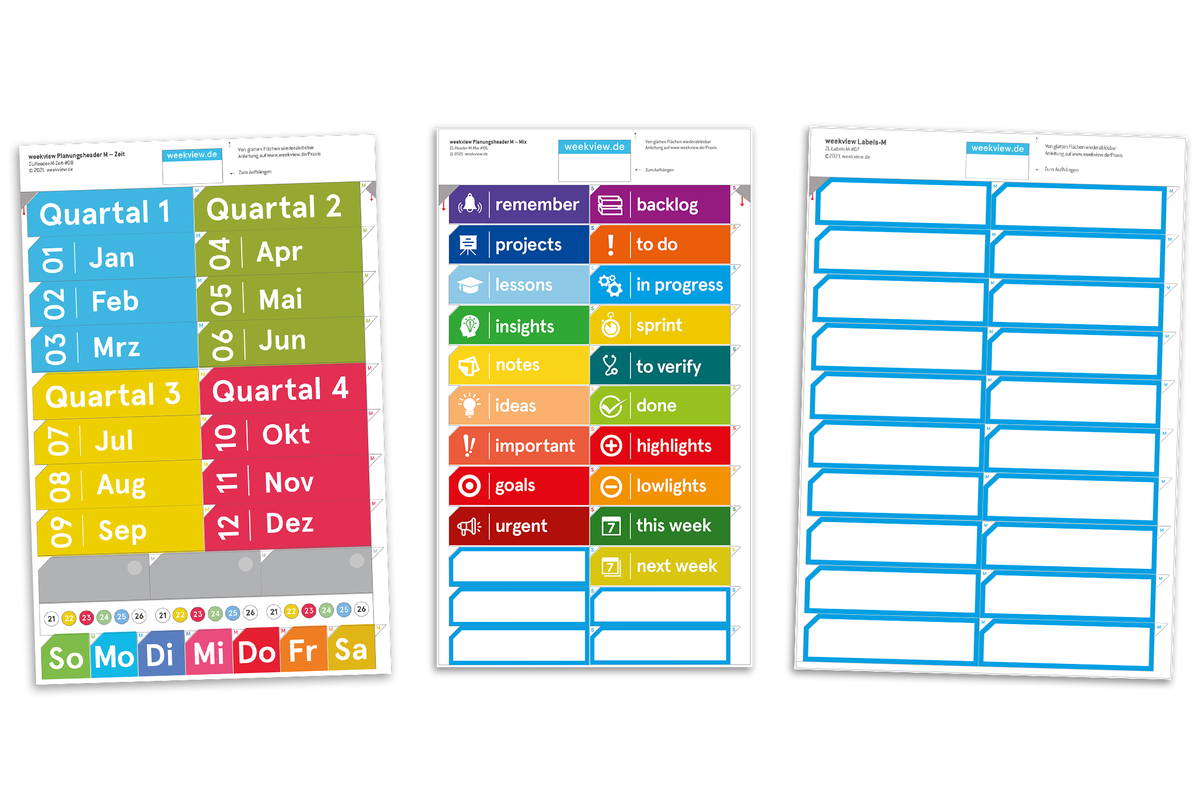
This is what planning headers M look like – three sheets that sort an empty surface between them. Tap a spot or pick one from the list.
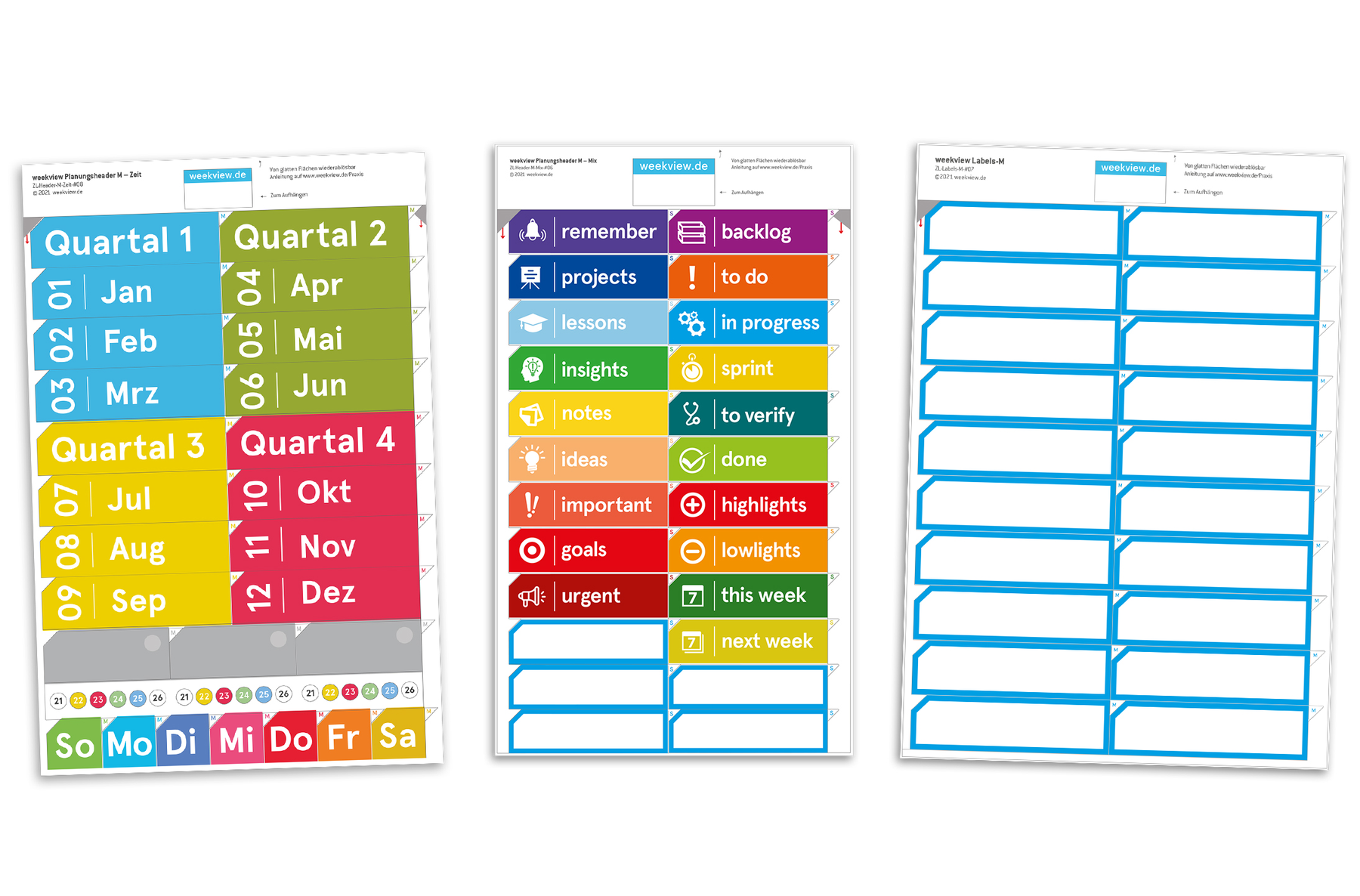
Quarter 1 to Quarter 4
The four quarter bars structure the year before any month is named. They carry the largest type on the sheet – so you can tell from across the room which section you're reading.
Jan to Dec with month number
Every month carries its number on the left – 01 Jan, 02 Feb, 03 Mar. The colour belongs to the quarter above, so you can spot a quarter as a block without reading a word.
The week numbers
Below the months sits a row of small week numbers. If you plan the weekview way, you think in calendar weeks – and you want that number in plain sight, not worked out in your head.
Sun to Sat in a row
The weekdays start at Sun. That's no misprint: the weekview week starts on Sunday morning at 6:00 am, so Sunday evening already belongs to the new week.
The mix set
The second sheet names no time, but a state: remember, backlog, projects, to do, in progress, to verify, done – plus important, urgent, goals, this week and next week. That turns an empty surface into a Kanban board.
Write your own
The third sheet is deliberately blank. Whatever weekview hasn't pre-printed – a project name, a department, a client name – you write on yourself, with a permanent or non-permanent film marker.
Why stick instead of print? Because structures change. A printed board fixes its columns for ever – a set of headers can be rearranged after a quarter, with no need to buy a new board.
Three products. All of them stick on.
Printed film for real surfaces. The digital versions for tablet and Office live under Digital & print versions.
Planning headers
Time set with quarters, months and weekdays, mix set from remember to done, plus blank labels. Size S measures 50 × 14 mm and is designed for A3.
9.90 to 19.90 €Team Icon Set People
8 × 12 icon tags at 24 × 24 mm with faces – for Kanban, Scrum and any plan where a task needs a person. Complete with the weekview tab.
14.95 €Week stickers 2026
Adds dates to undated planners: week number, year, year colour, month abbreviation, date and weekday, public holidays in bold. Each sticker 5.5 × 4.1 cm.
8.90 €Labels and neon labels
Headers name the column, labels mark the entry inside it. Both are repositionable and writable – and sit one world over in Labels.
from 5.90 €Readable, consistent, movable, universal
You could just write the column headings by hand. Only then nobody reads them from three metres away.
Printed beats handwritten
A printed header is always the same size and the same colour. Handwriting shrinks as space gets tight – and from a metre away it disappears.
1 m awayEveryone calls it the same
If a column is called in progress , it's called that for everyone. No “in the works” over here and “running” over there – that's half the value of a shared board.
View headersStructure is allowed to change
After a quarter the layout often no longer fits. Headers can be peeled off and placed again – a printed grid can't.
reusableOn other people's boards too
The headers aren't tied to weekview. A whiteboard from the office supplier, a glass door, a fridge – anything firm and smooth can be structured with them.
any smooth surfaceOne sheet, and your board has columns.
Size M is the compromise that works on most boards: big enough for the room, small enough for an A2 board.
Planning headers M
Quarters, months, calendar weeks and weekdays on one sheet – remember to done on the other. Plus a sheet of blank labels for everything weekview hasn't pre-printed.
- Q1 to Q4
- Jan to Dec with number
- Sun to Sat in a row
- backlog to done
- Blank labels to write on
- Removable, reusable
Size S is designed for A3 and measures 50 × 14 mm. Prices incl. VAT, plus shipping.
Stick first. Then write.
Four steps that turn an empty surface into a board you'll actually use.
“First you know where things belong – then you write them down.”
Three surfaces, three occasions
Whenever several people look at the same surface – and need to agree on what they see.
“Where's the ticket at?”
Three headers – backlog, in progress, done – and the whiteboard in the meeting room becomes a Kanban board. The Team Icons add who has taken it on.
“Which quarter are we in?”
Quarter bars at the top, months below: an empty surface becomes a year grid you can read from your desk without standing up.
“Which week was that again?”
Undated planners – TinyPad, ReflexionsPad, your own journal – get a date from the week stickers: week number, month, public holidays. Without writing a thing.
What customers say about the headers
One verified review of the planning headers, rated five out of five stars.
Little everyday helpers that structure and display everything beautifully.
Super-fast delivery, top-quality goods, absolutely perfect — I'd order again any time!
Verified shop reviews, published as written. You'll find further reviews on the product pages.
Frequently asked questions about headers & icons
Do the headers work on someone else's whiteboard?
What's the difference between the time set and the mix set?
Can the headers be peeled off again?
What exactly are the Team Icons?
What are the week stickers 2026 for?
Why does the weekday row start on Sunday?
Are the headers available digitally too?
So what marks the entries themselves?
First the column. Then the content.
A set of headers costs 9.90 € and decides whether your board gets used or stays empty.
These worlds might be for you

weekview Team Icon Set People 1 – symbols for Scrum, Kanban & agile work

weekview planning headers – labelling for whiteboards & boards

weekview week data, month assignment and quarter structure as practical stickers for undated planners.