
One touch.
And you are there.
Index tabs turn a book into a structure you can actually get hold of. Months, quarters, years – and the sections you really use: Goals, Projects, Info, Tools, Lists, Notes, Contacts, Timeline. Stuck on in five minutes, and no more flicking through pages.
Small tabs with a big effect.
An index tab is a sticker you place on the edge of a page and fold around it. The label then sits on the outside of the book’s edge – and you reach the right page without flicking through.
That is exactly what separates them from a bookmark: a bookmark marks one spot. A sheet of index tabs marks every spot you need regularly – and it does so permanently.
The sheets are not tied to weekview. They work in any calendar, any planner and any notebook, whoever made it.
On one sheet
- 8 quarter tabs – Q1 to Q4, each one twice.
- Year tabs – on the 2027 sheet: 2027, 2028, 2029.
- 12 months from Jan to Dec.
- Current week – the tab with the eye.
- Goals, Projects, Info, Tools in shades of green.
- Lists, Notes, Contacts, Timeline in shades of blue.
- 12 blank tabs to label yourself, 2 × 4 colours.
- Week and month tabs on the second sheet.
One sheet. Your whole book.
Eight groups, from top to bottom. Tap one – or pick it from the list.

Quarters
Eight tabs, Q1 to Q4 each one twice – once for the current year, once for the year ahead. Each colour stands for a quarter, so the edge of the book shows you straight away where the stage begins.
Years
The Tabs 2 – 2027 sheet carries the years 2027, 2028 and 2029 in orange – for planners with a multi-year overview or for notebooks that run longer than a year.
Months
Jan to Dec, in the colours of their quarters. That way you find every month with one reach – the classic use in a book calendar.
Current week
The green tab with the eye. It travels with you: stick it on the week you are in and move it on again each week. That is why it sits on the far right of the sheet rather than with the months.
Goals
The first of the eight section tabs, in a strong green. It marks the part of the book that holds your annual and quarterly goals – the page you open least often and most urgently want to find again.
Projects, Info, Tools
Three shades of green for the working part: current projects, reference pages and methods. If you use the Business Planner, they go on the project overview, the info pages and the tool pages.
Lists & Notes
The switch to blue marks the collecting part. Lists for everything that recurs, Notes for the free pages – the two sections people hunt for most in daily use.
Contacts & Timeline
Two light blues at the end of the sheet. Contacts for the address pages, Timeline for the time axis or the multi-year overview.
Why is everything printed twice, once mirrored? Every tab is printed twice – mirrored and normal. You fold it around the page edge, so it reads from the front and from the back.
Two sheets, one system.
The first sheet brings the fixed structure: time and sections. The second brings the movable one: weeks, months and blank tabs to label yourself.
Quarters, years, months
Eight quarter tabs, twelve months and – on the 2027 edition – the years 2027 to 2029. A quarter’s colour family runs through all three of its months.
Eight organising fields
Goals, Projects, Info, Tools in green – Lists, Notes, Contacts, Timeline in blue. The change of colour separates the working part from the collecting part at a glance.
Current week
The green tab with the eye travels with you. It sits on the week you are in and moves on every week.
Week and month
Red tabs, „Week“ three times and „Month“ twice – for everyone who wants to keep several places open at once.
12 blank tabs, 2 × 4 colours
Unlabelled tabs in blue, green, pink and yellow. For your own categories, projects or sections that no standard sheet covers.
Place it once and it stays put
The sheet carries the warning itself: removal without residue is not guaranteed. Tabs that are meant to travel – week, month – should be dabbed on the palm of your hand a few times first.
Week, month, quarter, year
weekview plans in levels – the week as the engine, the quarter as the frame. The tab sheet maps exactly these levels, so you jump from one to the next inside the book instead of hunting for them.
The week
The tab with the eye marks where you are right now. It moves on with you every week.
Current weekThe month
Twelve tabs from Jan to Dec, coloured by quarter. The classic way to navigate a book calendar.
View compactThe quarter
Eight tabs, Q1 to Q4 twice over. If you think in stages, you reach the quarterly part without a detour.
Business PlannerThe year
2027, 2028, 2029 in orange – for multi-year overviews and books that run longer than one calendar year.
All plannersOne layout. Two editions.
The section tabs are identical. The difference lies in the years – and in the scope.
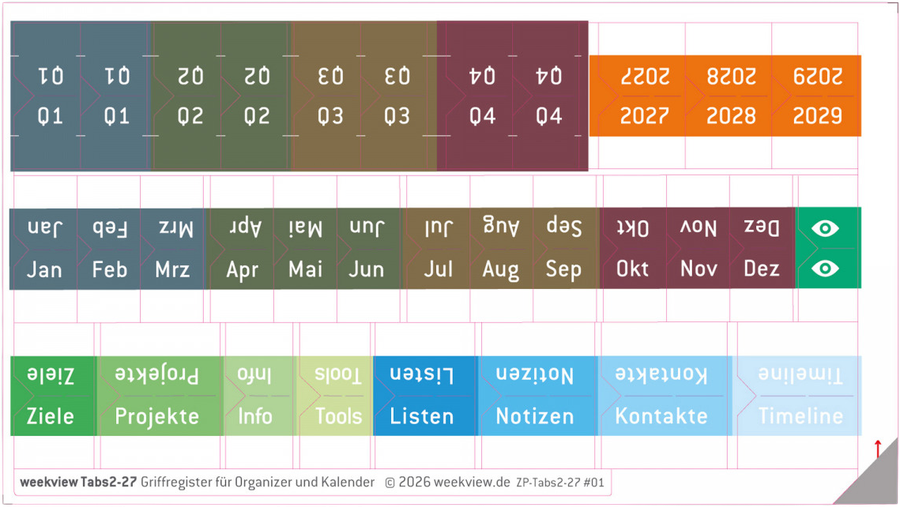
weekview Tabs 2 – index tabs for organisers and calendars
Sheet size 14.1 × 9 cm. For calendars, planners and notebooks – not just weekview. Stick it on, fold it around the page edge, done.
- Current week as a travelling tab
- 12 months, coloured by quarter
- 8 quarter tabs
- Goals, Projects, Info, Tools
- Lists, Notes, Contacts, Timeline
- 12 blank tabs to label yourself
The Tabs 2 at 3.90 € covers the years 2024 to 2026, the Tabs 2 – 2027 at 6.90 € covers 2027 to 2029 and adds the second sheet with the blank tabs. Prices incl. VAT, plus shipping.
Sticking them on is easy. Where is the decision.
The sheet comes with more tabs than most people need – and that is deliberate. Four steps, and your book has the layout that suits you.

„No patience for long searches.“
Three people who have stopped flicking through
The same tabs, three completely different layouts.
„I jump between the months.“
Twelve tabs along the edge of the book, sorted by quarter colour. The classic layout for a book calendar – and the reason the months form the longest row on the sheet.
„My book has chapters.“
Goals at the front, Projects in the middle, Lists and Notes at the back. If you use the Business Planner, the eight section tabs go on exactly the parts it already has.
„My categories are not on any sheet.“
Client A, Client B, the club, your degree. That is what the twelve blank tabs in four colours are for – labelled by you, and still part of the same system as the rest.
What one customer writes about them
There is one review of the index tabs so far – with five out of five stars.
These stickers simply belong with the Business Planner. I forgot to order them at the same time. I missed them, because I have been using them for years. Great for organised people who have no patience for long searches.
Verified review from the shop, shortened – not rewritten.
Frequently asked questions about the index tabs
Do the index tabs only fit weekview planners?
What is on one sheet?
Why is every label printed twice, once mirrored?
Can the tabs be removed again?
What is the difference between Tabs 2 and Tabs 2 – 2027?
How big is a sheet?
Can I label my own sections?
What else fits in my planner?
Your book gets grips.
Months, quarters, years and eight sections – stuck on in five minutes, then a whole year without searching.
These worlds might be it

weekview Practical index tabs for calendars, planners and notebooks. Quick access to important sections The self-adhesive index tabs help

Self-adhesive index tabs for planners and calendars: week, current, month, 2027–2029, goals, projects, lists and blank tabs. Incl. stickers S and M.

weekview For calendars, planners and notebooks – faster orientation with practical index tabs.