
One symbol says more
than a line.
What is a sticker on paper is, digitally, a PNG file: drag it in, drag it bigger, done. Scalable to any size with no loss of sharpness, descriptively named and loadable one by one – for GoodNotes, Xodo, Word and PowerPoint.
Not an image. A building block.
A Digital Sticker is a single PNG file with a transparent background. You drag it onto your planner page, into a Word document or onto a PowerPoint slide – and it sits there like a sticker, except that you can move it, enlarge it or delete it again whenever you like.
The decisive advantage is the scalability: the symbols stay sharp, whether they sit five millimetres tall on a weekly page or fill half a slide. And because every file is descriptively named , you find the right symbol by searching filenames instead of scrolling.
The second set is the Digital Header: the same headings that come printed to stick on – quarters, months, weekdays and the themes from backlog to done – only as PNG for the screen.
Works in
- GoodNotes and Notability on iPad and iPhone
- Xodo on Android, Windows and in the browser
- Word and PowerPoint – and in anything that imports PNG
- Also in image editing and layout programs
Two sets
- Digital Sticker – colourful symbols from travel and household to weather, plus services and brands
- Digital Header – Quarter 1 to 4, Jan to Dec, Sun to Sat
- Plus themes: remember, backlog, to do, in progress, done
- And prompts: important, urgent, goals, highlights
Seven colours. One system.
The symbols are sorted by theme, and the colour is the theme. Tap a row or pick it from the list.
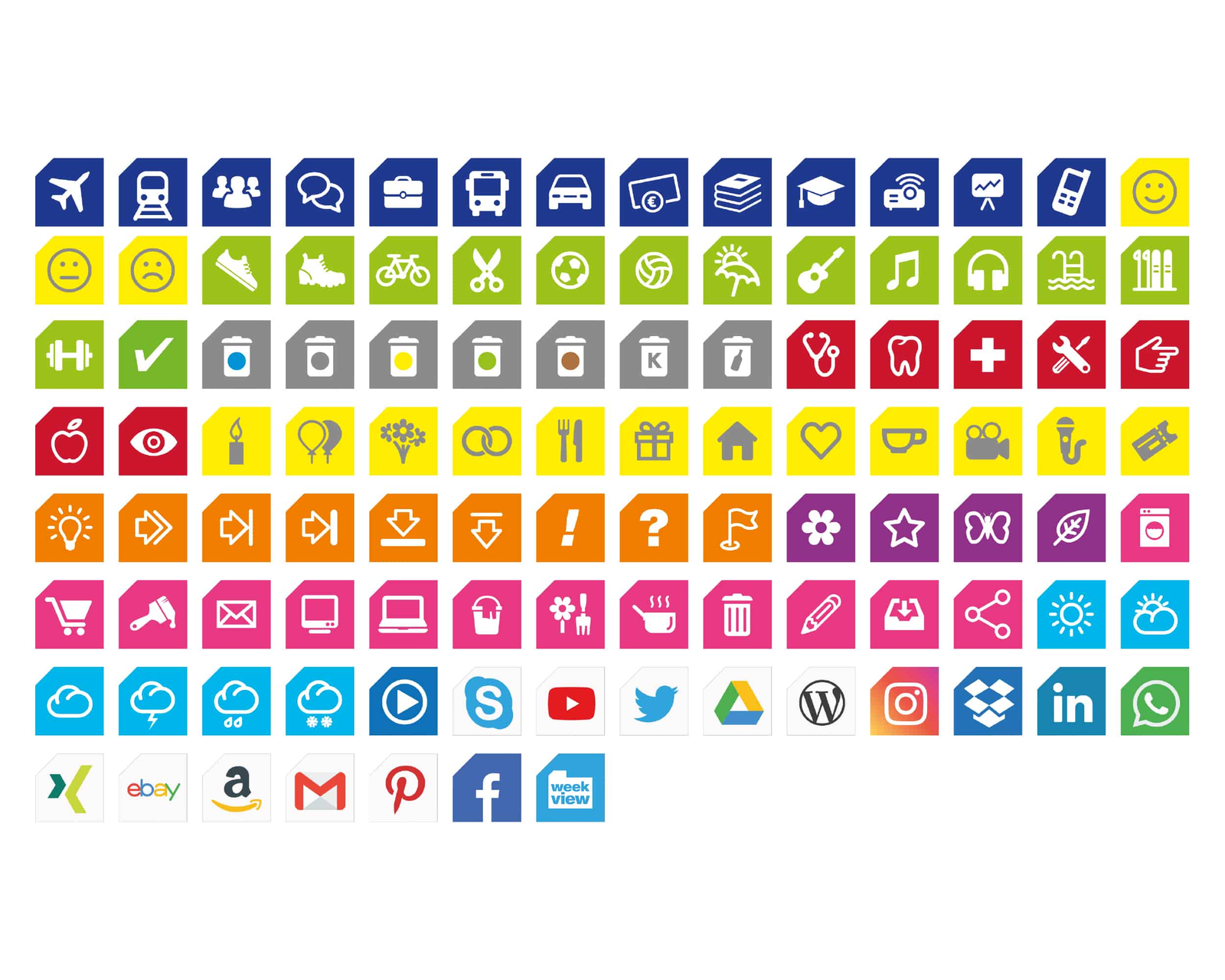
Dark blue: out and about, and in between
Aeroplane, train, bus, car, suitcase, meeting, money, books, graduation cap, phone. Everything to do with appointments away from home carries the same dark blue – you spot a travel day without reading a word.
Green: whatever does you good
Running shoe, hiking boot, bicycle, football, swimming, guitar, sheet music, headphones, library – plus two smileys for the mood of the day. Green means: that one was for you.
Grey and red: chores and check-ups
Washing machine, tumble dryer, dumbbell and hook in grey – stethoscope, tooth, cross and tools in red. The difference between “has to be done” and “concerns your health”.
Yellow: whatever gets celebrated
Candle, balloons, flowers, rings, gift, house, heart, cutlery, cup, camera, microphone, ticket. Birthdays, weddings, dinners, concerts – everything you remember because you are looking forward to it.
Orange and violet: the state a thing is in
Lightbulb for the idea, arrows for postponed, exclamation mark for urgent, question mark for open, flag for milestone, star for important. This row replaces most of what you would otherwise scribble alongside.
Pink: the small print of the day
Shopping trolley, letter, screen, laptop, cleaning bucket, garden, tea, bin, pen, picture, share. The things that are not appointments but still have to get done.
Light blue and brands
Sun, cloud, rain, thunderstorm, snow – and below them the services many people work with: Drive, Dropbox, LinkedIn, WhatsApp, Instagram, YouTube, WordPress, Xing, ebay, Amazon, Gmail, Pinterest, Facebook. That way you mark where something sits, not just what it is.
Why PNG and not PDF? Because a PNG fits into any program and has a transparent background. It lays itself over the page instead of replacing it – and you can drag it to any size without pixelating.
Two sets. Hundreds of building blocks.
Both come as a ZIP with individual PNG files – yours the moment you buy, no installation.
Digital Sticker
Colourful symbols sorted by theme: travel, sport, health, household, family, status, everyday life and weather – plus the services and brands everyone uses. Loadable one by one, descriptively named.
19.90 €Digital Header
Quarter 1 to 4, Jan to Dec, Sun to Sat – plus the themes remember, backlog, projects, to do, lessons, in progress, insights, sprint, notes, to verify, ideas, done.
19.90 €Prompt headers
Six more terms for whatever stands out: important, this week, goals, next week, urgent, highlights and lowlights.
included in the setOnto the planner page
Drag it straight onto the weekly page in GoodNotes or Xodo – instead of handwritten notes you cannot decipher later.
GoodNotes · XodoInto presentations and documents
In PowerPoint as a symbol on the slide, in Word as a marker in the text. Because the files load one by one, you take exactly the one you need – not the whole sheet.
Word · PowerPointHeader & Icons to stick on
The same language, in vinyl: planning headers in S, M and L, Team Icons and weekly stickers are filed under Header & Icons.
from 8.90 €Faster, more consistent, bigger, cleaner
You could write it all out. Only nobody reads a page with twenty scribbled notes – a page with twenty symbols, they do.
Colour before text
The eye picks up colour and shape before it reads. A blue symbol says “on the road” before you have deciphered the word – even on a full weekly page.
7 theme coloursAlways the same sign
Handwriting changes with the day. A PNG does not. Use the same sticker for the same type of appointment and you can flick through your year later and spot the patterns.
Digital StickerScales without pixelating
The same symbol sits five millimetres tall in the day column and fills a quarter of a PowerPoint slide – without ever going blurry.
losslessNo rubbing out
A sticker gets moved or deleted, not crossed out. The page stays readable, even when the appointment has shifted three times.
changeable at any timeA sticker sheet that never runs out.
The Digital Sticker set covers all of everyday life – from the business trip to the washing machine.
weekview Digital Sticker
Colourful symbols for digital planning: scalable to any size with no loss of sharpness, descriptively named and loadable one by one. Made for PDF apps such as Xodo and GoodNotes – and just as much for Word and PowerPoint.
- Sorted by theme colour
- Scalable to any size
- Loadable one by one
- Descriptively named
- Transparent background
- For GoodNotes, Xodo, Word, PowerPoint
The stickers are for the buyer's own use only. They may not be passed on to third parties or uploaded to public platforms – your own private cloud excepted.
Unzip. Then drag.
Four steps from download to the first symbol on your weekly page.

“One sign that always means the same thing.”
Three pages, three occasions
Whenever a page gets too full to read.
“I cannot see a thing for all the text.”
Five entries a day is a wall of writing. Five symbols beside them and you can tell at a glance whether the day brings meetings, sport or housework.
“The slide needs an image.”
Instead of trawling through icon libraries: drag a PNG file out of the folder, make it bigger, done. And every slide looks of a piece, because the symbols come from the same set.
“What actually happened back in May?”
Use the same symbols for a year and you spot the patterns when you flick back: March full of travel, July full of green. No list will show you that.
What the descriptions say
There are no customer reviews for the digital sets in the shop yet. So here are two lines from the product texts themselves – unchanged.
These unique, practical and colourful stickers have one outstanding advantage. They scale to any size without losing the sharpness you need.
The Digital Header give your planning structure, order and an outstanding look.
Not a customer quote but weekview's own product description – flagged as such because these two items have no reviews yet. The printed planning headers do have a five-star review: “Little everyday helpers that structure and present everything beautifully.”
Frequently asked questions about stickers & headers
What exactly do I get?
Which programs does it work in?
Do the symbols go blurry when I enlarge them?
What is the difference between stickers and headers?
Is there a stick-on version too?
May I pass the files on?
Do I need a Digital Planner for this?
Are there any shipping costs?
First the colour. Then the word.
Both sets cost 19.90 € and are ready as a ZIP the moment you buy.
These worlds could be the ones

weekview digital stickers as a PNG download for iPad and GoodNotes. The perfect addition to the weekview Digital Planner. Available immediately after purchase.

High-quality weekview planning product – well thought out, functional, Made in Germany. Perfectly matched to the weekview system.